


TuneLush-Offline Music Player
4.410.00 Reviews
App Specs
- Version
- 1.0.6
- Updated On
- License
- Free
- Downloads
- 100,000+
- Developer
- Motasemviedo dev
- Categories
- Tools
- Platform
- Android
Screenshots
 Analysis by AppCompare
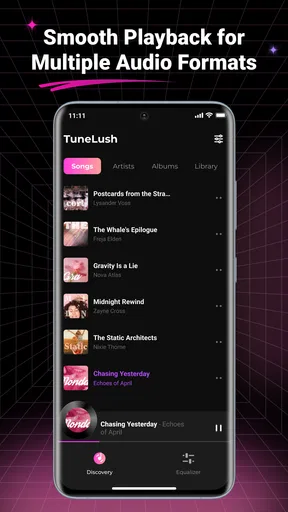
I spent time with TuneLush-Offline Music Player as a practical music tool rather than treating it like a full streaming service. That distinction matters. Its appeal is built around playing music already available on your device, creating playlists, viewing lyrics, and scanning local audio. I found the experience most convincing when I wanted a simple library that stayed close to my own files instead of another service asking me to search through an enormous online catalog.
The app is free, aimed at Everyone, and comes from Motasemviedo dev. Its current version is 1.0.6, and it runs on Android 7.0 or later. Those details make it accessible to people using older phones, while the free price removes the usual trial-or-subscription decision. Still, I would not choose it automatically for every listener. The right question is whether you want control over local music and a lightweight playback routine, or whether you depend on cloud catalogs, synchronized libraries, recommendations, and account-based listening.
What using TuneLush feels like in everyday listening
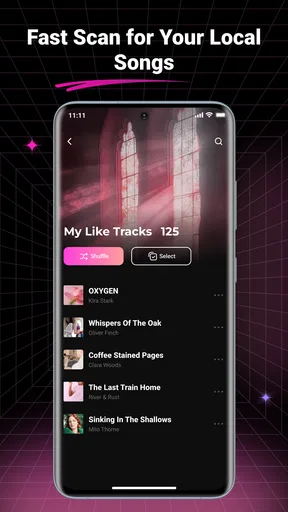
The first useful thing to understand is the app’s center of gravity: it is a local music player. Instead of beginning with an online search box, I approached it by letting the app scan audio stored on the phone. That workflow is especially convenient after transferring albums from a computer, downloading music through another legitimate source, or keeping a personal collection of recordings that streaming platforms do not carry.
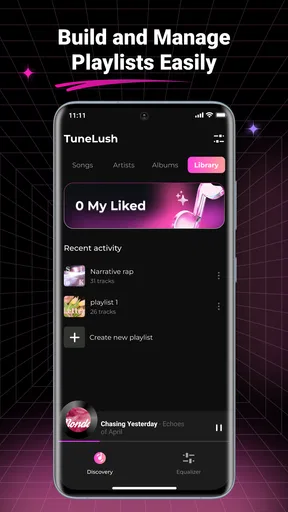
Scanning local files sounds basic, but it changes the rhythm of setup. A good local player should help you move from scattered files to something you can actually browse. TuneLush makes playlists part of that process, so I could think in terms of listening situations rather than only folders. A playlist for commuting, another for quiet work, and a third for downloaded albums is more useful than repeatedly opening a file manager and selecting tracks one by one.
The offline approach also has a clear everyday benefit. Imagine leaving home with a phone containing a carefully selected set of albums and taking a train through areas with unreliable reception. A local player avoids buffering and does not make the quality of your listening depend on a mobile signal. It can also be a sensible choice when you want to preserve data usage, although the convenience depends on having already placed the music on the device.
Lyrics add another layer to that offline routine. I liked the idea of having words available while a track plays, particularly for songs I am learning or for music where the vocals are difficult to catch. I would treat lyrics as a useful companion rather than the reason to install the app. The main value remains straightforward playback and organization; lyrics become worthwhile when they are available for the tracks in your own collection.
The app’s short identity, “TuneLush,” is reflected in its focused scope. I did not approach it expecting podcasts, radio stations, social discovery, or a giant recommendation engine. That focus is a strength for people who want fewer distractions. It is also the first important limitation: listeners who judge a music app by the size of its catalog will find a local player fundamentally different from Spotify, YouTube Music, Apple Music, or similar services.
Worth Reading Before You Choose

EA SPORTS FC Mobile 26 Is a Bigger Football Game, but It Takes Time

Flipboard Shows What News Apps Must Do Beyond the Feed

Switching to Android Auto Means Rethinking Your Driving Routine

Google Calendar Makes a Crowded Week Easier to Manage

Ludo King Makes the Most of the Minutes Between Plans

Baby Panda World Brings Quick Play to Modern Phones, but Its Game Library Feels Busy
Who will get the most from the local-first design
I would recommend it first to people who maintain their own music library. That includes listeners with purchased downloads, recordings transferred from a desktop, independent releases saved directly to a phone, or albums that they prefer to keep available without a subscription. It also suits anyone who wants playlists built from personal files rather than from a platform’s catalog and licensing rules.
It can be useful for a secondary device as well. An older Android phone can become a dedicated music player, and support for Android 7.0 or later gives the app a reasonable reach across older hardware. I would still keep expectations realistic: compatibility does not guarantee identical behavior on every phone, because local file organization and manufacturer software can affect how comfortable scanning and playback feel.
I would be more cautious about recommending it to someone whose collection exists almost entirely in the cloud. If your normal routine is searching for an artist you have never downloaded, following editorial playlists, or switching between devices through an account, this app’s local emphasis may feel restrictive. A streaming service will usually be the better primary tool in that situation, while TuneLush could remain a simple offline companion.
There is another group that may appreciate it: people who want to separate personal listening from their main online identity. A local player does not require the same kind of catalog browsing or account-centered routine as a streaming platform. That does not, by itself, prove anything about privacy or background behavior, so I would not turn the offline label into a broad privacy promise. I simply see value in having a listening workflow based on files you intentionally keep on your phone.
Scanning and organizing music without creating a mess
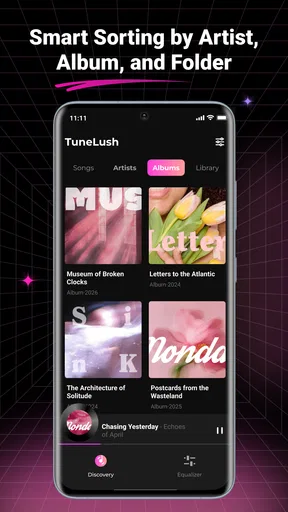
The local scan is the feature I would pay the most attention to during setup. Before scanning, I would clean up confusing filenames and remove duplicate copies where possible. A player can only organize what it can read from the files, and inconsistent artist or album information can make a library feel untidy even when the app itself is working correctly.
My practical tip is to start with a small, well-organized group of albums rather than placing every audio file on the phone and immediately scanning everything. That gives you a clearer first impression and makes it easier to spot how the library handles your files. Once the structure looks sensible, add the rest. This staged approach is more useful than blaming the player for a collection that was already difficult to browse.
Playlists are most effective when they solve a repeatable problem. I would create them around moments such as a short walk, focused work, or a no-signal journey, rather than making one enormous list that becomes another folder to search. Because the app is local, playlists should be planned with the phone’s storage and the music you actually carry in mind. The trade-off is simple: you gain a dependable personal selection, but you must curate that selection yourself.
Another small but important habit is to rescan after moving or adding files. A local player cannot organize a track it has not discovered, and file transfers can happen outside the app. If a newly added album does not appear immediately, I would first check the file location and then look for the app’s scanning action rather than assuming the audio is unsupported.
Lyrics are helpful, but they do not replace library preparation
The lyrics feature makes the player feel more complete than a bare folder-based audio tool. For me, it is most useful when listening actively: following a chorus, checking a line, or practicing along with a song. It can turn a passive listening session into something more interactive without requiring a separate lyrics app.
There is a practical limitation to keep in mind. Lyrics do not make a local library self-organizing. You still need the tracks to be present, recognizable, and arranged in a way that makes sense. I would therefore treat lyrics as a layer added to a good playback workflow, not as a replacement for careful file management. If your main interest is karaoke-style timing or a huge lyric database, a specialized service may be a better match.
I also prefer to keep expectations measured around any feature that depends on song information. Music files vary widely in how much metadata they contain, and personal collections often include incomplete tags. When a track is not identified neatly, the most useful response is usually to fix the file information or rename it consistently, then refresh the local library.
Trust begins with visible choices, not assumptions
Because this is an app that works with music stored on a phone, I paid attention to the boundary between the app and my personal library. The important user choice is whether to allow the app to inspect local audio so it can perform its central job. I would read the Android permission prompt carefully and grant only what is needed for scanning music. If the phone presents a choice between limited and broad access, I would select the narrowest option that still lets the intended library work.
I would not describe offline playback as proof that no information ever leaves the device. “Offline” explains the playback model, not every possible data practice. For a trust-conscious installation, I would review the app’s permission screen, the privacy information shown in the store or inside the app, and Android’s permission manager. Those checks give me a better basis for deciding than assumptions based on the app’s name or category.
The developer is Motasemviedo dev, and the app has built a modest public footprint: it shows a 4.4 average from around 121 ratings, with over 100 thousand installs. I see that as enough activity to suggest that other people are using it, but not as a substitute for my own testing. Ratings can tell me whether an app has attracted attention; they cannot tell me how its permission requests will fit my phone or how well my particular music collection will scan.
When handling personal audio, I would also think about the phone itself. A local player may not need an account for basic use, but the device can still contain sensitive information, and music files can reveal personal tastes or private recordings. I would avoid giving storage access casually on a shared device, remove files I no longer need, and review permissions after major updates. These are sensible controls regardless of whether the app is free or paid.
Where user control matters most
The strongest form of control here is choosing what enters the library. I can decide which albums remain on the phone, which playlists represent my routines, and whether to keep a compact selection instead of carrying everything. That is different from a streaming service, where the platform’s catalog and account settings shape much of the experience.
For a cleaner setup, I would separate music into clearly named folders before scanning. One folder might hold finished albums, another personal recordings, and another temporary files. This is not a glamorous feature, but it gives me a way to manage the library outside the player too. If I later uninstall the app or change phones, the music remains part of my own file collection rather than being locked into an app-specific catalog.
That independence has a cost. A local playlist can be convenient on one phone but less portable than an account-synchronized playlist. Moving to another device may require transferring both the audio and any playlist information in a compatible way. If seamless cross-device continuity is central to your routine, I would choose a service designed around synchronization instead.
I also would not use this app as my only backup plan for important recordings. A music player organizes and plays files; it should not be confused with a backup system. For irreplaceable personal audio, I would keep another copy somewhere secure. That advice is particularly important when the phone is the main place where the collection lives, because a lost or damaged device can remove access to everything at once.
How it compares with streaming players and basic file tools
Compared with streaming apps, TuneLush gives me a quieter and more self-directed experience. There is no need to search a remote catalog for music I already own, and offline playback is built into the logic of using local files. I also avoid the distraction of recommendations when I simply want to press play on a prepared playlist.
Streaming services win when discovery is the priority. They are better for exploring unfamiliar artists, following new releases, sharing listening activity, and maintaining a library across several devices. They can also reduce the work of collecting files manually. I would choose TuneLush over them only when my own music is already the center of the experience and I value local access more than catalog breadth.
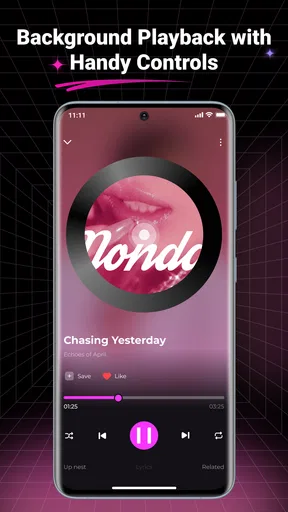
Compared with a phone’s basic file manager, the dedicated player is more comfortable for repeated listening. Playlists, playback controls, and lyrics create a music-oriented layer that folders alone do not provide. A file manager may be sufficient for occasionally opening one recording, but it becomes awkward when I want a queue for a commute or a reusable selection for work.
Compared with more advanced local players, the decision depends on how much control you need. Some listeners want extensive equalizer settings, format-specific tools, network-library support, or elaborate tagging options. TuneLush’s attraction is its approachable combination of scan, playlists, lyrics, and offline playback. If your priority is audio experimentation or technical customization, another specialist player may offer a deeper toolbox.
Small friction points I would plan around
The biggest friction is not a broken feature; it is the responsibility placed on the listener. You need music files on the phone, and you need to keep them organized. Someone expecting an instant catalog after installation may feel that the app has less to offer than a streaming service, even though that difference is intentional.
Scanning can also expose the weaknesses of a messy collection. Duplicate tracks, vague filenames, and missing tags make browsing harder. My advice is to treat the first scan as an audit of your library. If the result looks confusing, improve the files in batches instead of repeatedly rescanning and hoping the presentation will fix itself.
Storage is another trade-off. Offline music is dependable, but the files occupy space on the device. I would keep high-priority albums available and move rarely played material elsewhere. That gives playlists a purpose and prevents a local library from becoming an unmanageable archive.
Finally, I would keep the app updated while still checking what changes. The installed version is 1.0.6, so I see it as a relatively focused tool rather than a mature platform with years of accumulated complexity. That can mean a clean experience, but it also makes it sensible to revisit permissions and settings after updates instead of assuming the interface and access model will never change.
My cautious recommendation
After using it as a local music player, I see TuneLush as a good fit for a specific kind of listener: someone with personal audio files who wants playlists, lyrics, and reliable offline access without turning music into another online account routine. The free price makes it easy to try, and the Everyone rating keeps the intended audience broad.
I would install it on a phone that already contains a thoughtfully arranged music collection, then begin with a limited scan and build playlists around real routines. I would review the permission request before allowing local access, check the app’s visible privacy information, and keep a separate backup of anything important. Those steps preserve the convenience of local playback without treating convenience as a guarantee about data handling.
My final view is positive but deliberately narrow. This is not the right replacement for a streaming catalog, a synchronized multi-device library, or a specialist audio laboratory. It is more useful when the music belongs to you already and you want a straightforward way to hear it. If your priority is personal control over offline listening rather than endless discovery, TuneLush is worth trying; if your priority is cloud convenience, choose a different primary player.
Pros
- Plays downloaded songs without an internet connection.
- Simple interface makes browsing local music quick and easy.
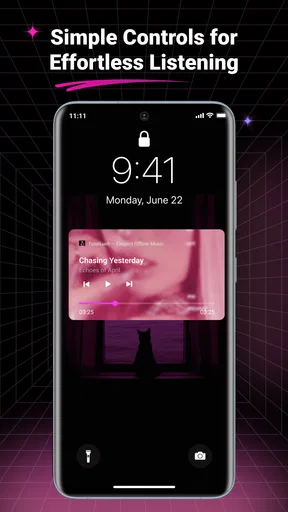
- Supports background playback while using other apps.
- Useful for saving mobile data during travel or commutes.
- Keeps music available in areas with weak or no signal.
Cons
- Requires music files to be stored on your device first.
- Library quality depends on accurate song metadata and artwork.
- Storage space can fill quickly with high-quality audio files.
- May lack the streaming catalogs found in major music services.
- Some advanced playback features may require extra setup.
FAQs for TuneLush-Offline Music Player
What is TuneLush-Offline Music Player?
TuneLush-Offline Music Player is designed for listening to music stored directly on your device without requiring a continuous internet connection. After adding compatible audio files to your local library, you can browse tracks, create playlists, and enjoy playback while traveling, commuting, or using limited mobile data. It is primarily intended for personal offline music collections rather than online streaming.
Can I listen to music offline with TuneLush?
Yes, offline playback is the main purpose of TuneLush. However, the app does not automatically provide copyrighted songs for download. You generally need to transfer legally obtained audio files to your phone first, then allow TuneLush to scan or access those files. Once they appear in the library, playback should work without Wi-Fi or mobile data, which is useful in airplane mode or areas with poor reception.
Which audio files are compatible with TuneLush?
Compatibility can depend on the device and the version of the application, but TuneLush is generally expected to work with common local formats such as MP3 and other widely supported audio files. If a track does not appear or play correctly, check whether the file is damaged, protected by digital rights management, or saved in an unsupported format. Keeping files in accessible folders can also help the library scan find them.
Does TuneLush include music streaming or free song downloads?
TuneLush should not be treated as a replacement for services such as Spotify, Apple Music, or other licensed streaming platforms. Its focus is local playback, meaning you are responsible for obtaining and storing your music legally. The app may organize files already present on your device, but users should be cautious with websites or tools promising unauthorized downloads, since those sources may violate copyright rules or expose the device to security risks.
What permissions does TuneLush require, and is it safe to use?
A local music player normally needs permission to access audio files or media storage so it can display your songs and play them. On newer Android and iOS versions, these permissions may be limited to selected files or media categories. Review the requested access before accepting it, and avoid granting unrelated permissions. Downloading TuneLush from an official app store and checking its privacy policy are sensible steps before importing personal music.


